

Switching between Michael, Franklin, and Trevor is one of GTA 5’s signature mechanics, and the controls are simple once you know where to look.
On PlayStation and Xbox, hold D-Pad Down, select a character with the right stick, then release the D-Pad. On PC, hold Left Alt, highlight the character with your mouse, and release Alt. There are also dedicated F5-F8 shortcuts on PC.
TL;DR – How to switch characters in GTA 5
- How character switching works in GTA 5
- How to switch characters on PS5 and PS4
- How to switch characters on Xbox
- How to switch characters on PC
- GTA 5 PC character shortcuts
- Switching characters during missions
- Why can’t I switch characters?
- How to switch characters in GTA Online
- Michael, Franklin, and Trevor abilities
- Does switching work differently in GTA V Enhanced?
- GTA 5 offers on G2A.COM
- More GTA 5 guides
- FAQ
How character switching works in GTA 5
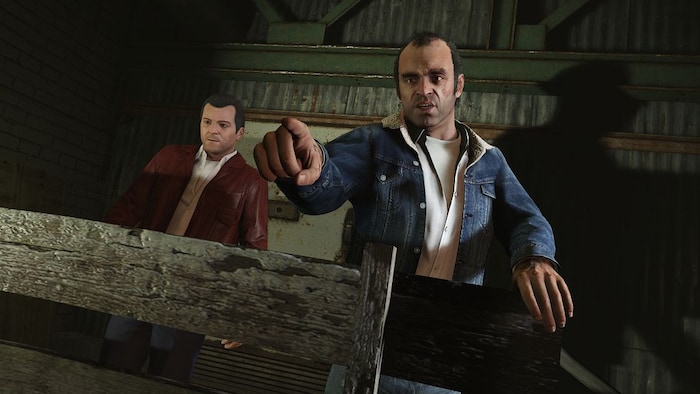
GTA 5’s Story Mode follows three playable protagonists: Michael De Santa, Franklin Clinton, and Trevor Philips. Once the story has unlocked them, you can switch between the available characters during free roam and during many missions.
Opening the character selector slows the game down and displays the protagonists around the character wheel. Select one and the camera pulls away from your current location before zooming back down to wherever the other character happens to be.
That last part is one of the reasons switching remains fun. Michael, Franklin, and Trevor continue living their own lives when you are not controlling them, so switching can drop you into a new activity, location, or occasionally a very questionable situation.
How to switch characters in GTA 5 on PS5 and PS4
The controls are the same basic process on PlayStation 5 and PlayStation 4:
- Hold D-Pad Down.
- Keep holding it to open the character wheel.
- Use the right analog stick to highlight Michael, Franklin, or Trevor.
- Release D-Pad Down while the character you want is selected.
The game will begin the transition immediately if switching is currently allowed.
How to switch characters in GTA 5 on Xbox
Xbox Series X|S and Xbox One use essentially the same controls:
- Hold D-Pad Down.
- Move the right analog stick toward the character you want.
- Keep that character highlighted.
- Release D-Pad Down.
If nothing happens, you may be in a mission or sequence where character switching is temporarily disabled.
How to switch characters in GTA 5 on PC
Keyboard and mouse players use the character selector differently:
- Hold Left Alt.
- The character wheel appears.
- Move the mouse toward Michael, Franklin, or Trevor.
- Release Left Alt once your chosen protagonist is highlighted.
This works in both GTA V Enhanced and GTA V Legacy on PC, assuming the story currently allows you to switch.
GTA 5 PC character shortcuts: F5, F6, F7, and F8
PC players also have dedicated shortcut keys. These are particularly useful if you already know exactly who you want to control and do not need to navigate the full character wheel.
Rockstar also notes that supported missions can let you tap the appropriate shortcut to switch directly to the relevant protagonist.
Important: F8 takes you toward GTA Online. It does not cycle between two GTA Online character slots. Managing your actual GTA Online characters is handled through the Online menu.
How character switching works during GTA 5 missions
Some of GTA 5’s best missions were designed around switching protagonists. A heist might have Franklin driving, Michael covering enemies from another position, and Trevor handling something significantly less subtle.
When a mission supports switching, the game may prompt you to change character at a specific moment. On PC, the shortcut keys can make this especially fast.
However, you cannot freely switch during every mission. Some sequences require a specific protagonist or temporarily lock the character wheel while the story, a cutscene, a chase, or another scripted event is in progress.
Why can’t I switch characters in GTA 5?
If the character wheel will not let you choose someone, it usually does not mean your game is broken.
- The character has not been unlocked yet. GTA 5 introduces its protagonists through story progression.
- The current mission requires a specific protagonist.
- You are in a scripted sequence, cutscene, or transition.
- The mission temporarily restricts switching.
- The protagonist may be unavailable because of the current story situation.
If you are in free roam and the control still appears unresponsive, finish or leave the current activity, make sure the game is not in another menu, and try again.
How to switch characters in GTA Online
This is where things get slightly confusing because switching Story Mode protagonists and changing your GTA Online character are different systems.
Rockstar currently allows you to maintain two GTA Online characters.
PS5, Xbox Series X|S, and PC Enhanced
- Open the Pause Menu.
- Select Online.
- Select Manage Characters.
- Choose the GTA Online character you want to use.
PS4, Xbox One, and PC Legacy
- Open the Pause Menu.
- Select Online.
- Select Swap Characters.
- Choose the character you want.
So if another guide tells you to look for Swap Characters and you cannot find it in PC Enhanced, PS5, or Xbox Series X|S, the guide may simply be using the older menu terminology.
Why switch between Michael, Franklin, and Trevor?
The protagonists are not just different faces. Each has a special ability that makes one character better suited to particular situations.
They also have different side activities, relationships, properties, and locations around the map, which gives switching a purpose even when you are nowhere near a main mission.
Does character switching work differently in GTA V Enhanced?
No major relearning is required. The basic Story Mode controls remain the familiar character wheel on controller and Left Alt on keyboard.
The important distinction is on PC. Rockstar released GTA V Enhanced on March 4, 2025 as a free upgrade for existing PC owners, while the previous PC build was renamed GTA V Legacy.
The Story Mode switching mechanic remains familiar in both versions. GTA Online menu terminology is where you are more likely to notice a difference: Enhanced uses Manage Characters, while Legacy uses Swap Characters.
GTA 5 on G2A.COM
If you are heading back to Los Santos, there are several GTA 5 offers on G2A Marketplace depending on your platform, launcher, and region.
Looking for another deal before returning to Los Santos?
G2A Plus members can collect Plus Points and access additional marketplace benefits. G2A Plus Premium also includes member prices on eligible items and other subscription benefits.
More GTA 5 guides on G2A News
- GTA 5 Main Characters – Meet Michael, Franklin & Trevor – learn more about all three protagonists and how they fit into the story.
- GTA 5 Beginner’s Guide – Story Mode Tips for New Players – abilities, money, weapons, vehicles, and useful early-game advice.
- All GTA 5 Cheat Codes for PC, PS5, PS4, Xbox, and More – the full updated cheat list for Story Mode.
GTA 5 character switching FAQ
How do you switch characters in GTA 5?
On PlayStation and Xbox, hold D-Pad Down, select Michael, Franklin, or Trevor with the right analog stick, and release D-Pad Down. On PC, hold Left Alt, highlight a character with the mouse, and release Alt.
What buttons switch characters on PC?
Use Left Alt for the normal character wheel. You can also use F5 for Michael, F6 for Franklin, F7 for Trevor, and F8 to switch toward GTA Online.
Why can’t I switch to Trevor in GTA 5?
Trevor must first be unlocked through Story Mode progression. He can also become temporarily unavailable during particular missions or story sequences.
Can you switch characters during missions?
Yes, but only when the mission supports it. Some missions actively use multiple protagonists, while others lock you to one character.
How many characters can you have in GTA Online?
You can have two GTA Online characters. On PS5, Xbox Series X|S, and PC Enhanced, use Online > Manage Characters. On PS4, Xbox One, and PC Legacy, use Online > Swap Characters.
Is character switching different in GTA V Enhanced?
The normal Story Mode controls are essentially the same. The main difference relevant to this guide is that GTA Online uses the newer Manage Characters menu in Enhanced.
Three criminals, one very convenient button
GTA 5 would be a very different game if Michael, Franklin, and Trevor were separated into three traditional campaigns. The instant character-switching mechanic is what lets their stories overlap and gives Los Santos the feeling that things keep happening even when you are somewhere else.
Thankfully, actually using it is simple: D-Pad Down on consoles, Left Alt on PC. The harder decision is figuring out whether your next hour is better spent driving with Franklin, shooting with Michael, or checking what Trevor has managed to set on fire this time.