



In the dark and mysterious world of Witchfire, staying alive is never easy. But learning how to use console commands can help you survive. These commands let you change the game, test different features, or make your fight against witches a little easier.
What is Witchfire?
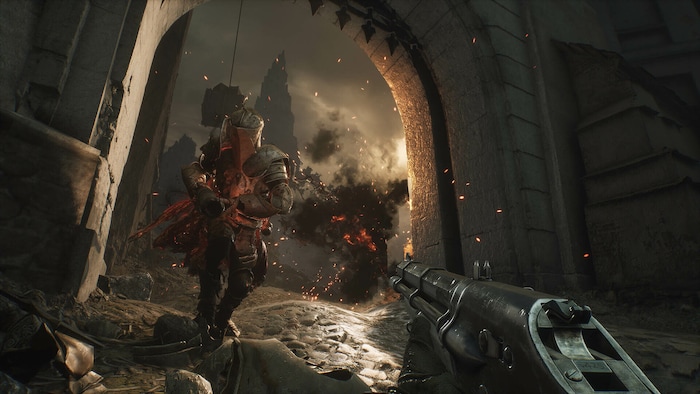
Witchfire is a first-person shooter that combines action with RPG and roguelite elements. You play as a Preyer — an undead hunter chosen by the Church to fight powerful witches. With guns and magic, you battle strong enemies in a dark world full of secrets and dangerous powers.
As you explore, you collect useful items, learn new skills, and face deadly challenges. The game is full of mystery and requires fast thinking and good reflexes. Each fight helps you improve and brings you closer to discovering the truth hidden in the shadows.
What this guide covers
This guide shows how players use Witchfire cheats and console commands to improve their experience. With these tools, you can change difficulty, fix problems, or even unlock special weapons and items. Cheats give you more control and help you explore Witchfire’s world in new and exciting ways.
How to Access the Console
For those who want more control over the game, enabling debug mode and using the console can be very helpful. It allows you to enter special commands that change things like difficulty, character stats, or give you extra items.
To access the console, you first need to install a tool called UE4SS (Unreal Engine 4 Script Support). After installing it in your Witchfire game folder, launch the game and press F10 to open the console. You can then type commands to adjust gameplay and discover new features.
Cheat tools (single-player only)
If you’re wondering how to enable cheats in Witchfire, you can use programs like Cheat Engine or game trainers to get features such as unlimited health or fast leveling. These tools usually come with instructions and hotkeys for easy setup. Use them only in single-player and scan downloads for safety before installing.
Useful Commands
In Witchfire, console commands can help you explore the game more freely and solve problems quickly. Some commands let you spawn items or enemies, which is great for testing weapons or practicing combat. Movement commands can also help with exploration or escaping danger. Resource commands are popular too, letting you add currency or boost stats for build testing.
| Command | What it does |
|---|---|
cheat AddWF 5000 | Add Witchfire currency. |
cheat AddGold 25 | Add gold. |
cheat DemoCheats | Enables a bundle of demo-style cheats (e.g., no feathers for upgrades, infinite ammo/health potions, etc.). |
cheat EndRun true | End the current run successfully. |
cheat TestTreasureDrops | Spawn treasure drops. |
cheat AddSupplyKey 5 | Add supply keys. |
cheat KillemAll | Kill all enemies. |
cheat Shredder | Enable one-hit kills. |
cheat UsainBolt | Infinite jump/dash/stamina. |
cheat AddNavigationCharts | Add navigation charts. |
cheat AddAllMasksFragments | Add all mask fragments. |
cheat TestAllDrops | Drop lots of items. |
cheat AddBoosterToken 10 | Add 10 Raven feathers. |
cheat AddDE 40 | Add 40 divine essence. |
cheat SetGnosis 10 | Set Gnosis to level 10. |
cheat AddWitchmark <name> | Add a witchmark (Endurance | Plenitude | Resiliency | Strength). |
cheat AddAllBoosterProphecyItems | Add all prophecy-related items. |
cheat AddRespecItem | Add a respec item (chronoclasts) to your inventory. |
cheat InfAmmo 2 | Infinite ammo (no reload). |
cheat InfAmmo 1 | Infinite ammo (reload still happens). |
cheat AddShadowOrb | Add Shadow Orb. |
cheat AddChargedShadowOrb 1 | Add 1 Charged Shadow Orb. |
cheat AddBoneGunFragment 10 | Add 10 bone gun fragments. |
Source: Nexus Mods
Useful Tips
- Play through the game naturally first, so you can fully enjoy the challenge and story.
- Understand what each command does to avoid ruining your experience or breaking progression.
- Never use cheats in online or competitive modes — it creates unfair advantages.
- Back up your game files before installing mods or trainers in case something goes wrong.
Mods
Mods in Witchfire allow players to change and improve their game in different ways. You can add new features, improve graphics, or make the game easier with special tools.
Many players use the Vortex Mod Manager, which works with both Epic Games and Steam versions. It makes it simple to install and organize mods. Most mods use .pak files and are usually compatible, but always follow each mod’s instructions.
Although the game doesn’t officially support modding, the community has created many popular mods online. With the right setup, you can enjoy a customized experience while keeping the game stable.
Warnings
To avoid bugs in Witchfire, follow a few simple steps:
- Keep your game updated — patches often fix crashes, missing sounds, and other issues.
- Use mods/cheats that match your game version — mismatches can cause weird behavior or errors.
- Back up your save files before installing anything new, so you don’t lose progress.
- If something breaks, restart the game or verify your files.
You can also report bugs to the developers via their Steam support page or Discord channel to help improve future updates.
Final thoughts
Mastering Witchfire through commands unlocks a new level of gameplay, where your strategy and skills truly shine. With Witchfire console commands at your fingertips and the right tools in place, every battle becomes a bold chapter in your personal legend. Step in with confidence, customize your experience, and turn the game into a journey worth remembering.