




Minecraft: Java’s latest snapshot (26.1 Snapshot 2) brings two important changes: Name Tags can now be crafted, and several baby mob models and textures have been updated.
TL;DR
Minecraft Java Snapshot 26.1 (Snapshot 2) — craftable Name Tags, cuter baby mobs, and better stability
Snapshot 26.1 focuses on quality-of-life and readability: you can finally craft Name Tags, baby animals got clearer visuals + new sounds, and Java gets some performance tweaks.
What changed (the big highlights)
- Name Tags are now craftable with 1 Paper + 1 metal nugget (any type).
- Baby mob visuals updated for: Cow, Sheep, Pig, Cat, Ocelot, Mooshroom, Wolf, Chicken.
- Rabbits got new animations + updated bounding boxes; old textures removed.
- New baby sounds for Wolves, Cats, and Pigs.
- Performance tweaks: default RAM increased to 4 GB + ZGC garbage collection added for stability.
Practical changes you’ll actually notice
- Less early-game friction — Name Tags no longer depend on chest RNG or villager trade grind.
- Cleaner farms and pet management — naming mobs becomes normal progression, not a “later” task.
- Better visual clarity — baby mobs read as “young” instantly, which helps when breeding or sorting pens.
- More personality — distinct baby sounds make early survival and animal handling feel more alive.
Craftable Name Tags — why it matters
- Early naming is now easy: pets, villagers you want to keep safe, farm animals, mob display builds.
- No more “wait until I find one” or “time to set up trading” just to name something.
Baby mobs update — what’s improved
- Updated models/textures make babies more distinct from adults at a glance.
- Rabbits feel more polished thanks to animation + hitbox/bounding box changes.
- New baby sounds add atmosphere and make mobs easier to identify by audio.
Remember: this is still a test build
- Snapshot features can change or be removed before release.
- Back up your worlds (or use a separate folder) before loading a save in a snapshot.
How to try it
- Open Minecraft Launcher → Installations → enable Snapshots.
- Create a new installation → select 26.1 Snapshot 2.
- Use a separate world/backup and report bugs via the official issue tracker.
Important tips: Craftable Name Tags are the real day-to-day win (especially early game), while the baby mob updates make breeding/farming clearer and cuter — just don’t forget to backup saves before testing snapshots.
These additions are part of a broader focus on cuteness and clarity for early 2026. New baby animal sounds are included too, showing Mojang is putting more care into atmosphere and early-game expression.
Minecraft Snapshot 26.1: What Changed
Name Tags can now be crafted using 1 Paper and 1 metal nugget of any type.
Visuals for baby mobs have been updated, including Cow, Sheep, Pig, Cat, Ocelot, Mooshroom, Wolf, and Chicken. Rabbits received new animations and bounding boxes, and their old textures were removed. Baby Wolves, Cats, and Pigs now have distinct new sounds.
Performance has been improved as well, with default RAM increased to 4 GB and ZGC garbage collection added for better stability.
Practical Changes You Will Actually Notice
This snapshot fixes small annoyances and cleans up parts of the game you interact with all the time. These are the kinds of updates you notice after an hour of play, not from a patch note headline.
Craftable Name Tags Finally Make Sense
Name Tags used to be locked behind luck or busywork. You either found one in a chest or spent time dealing with villagers and trades. That slowed things down, especially early on.
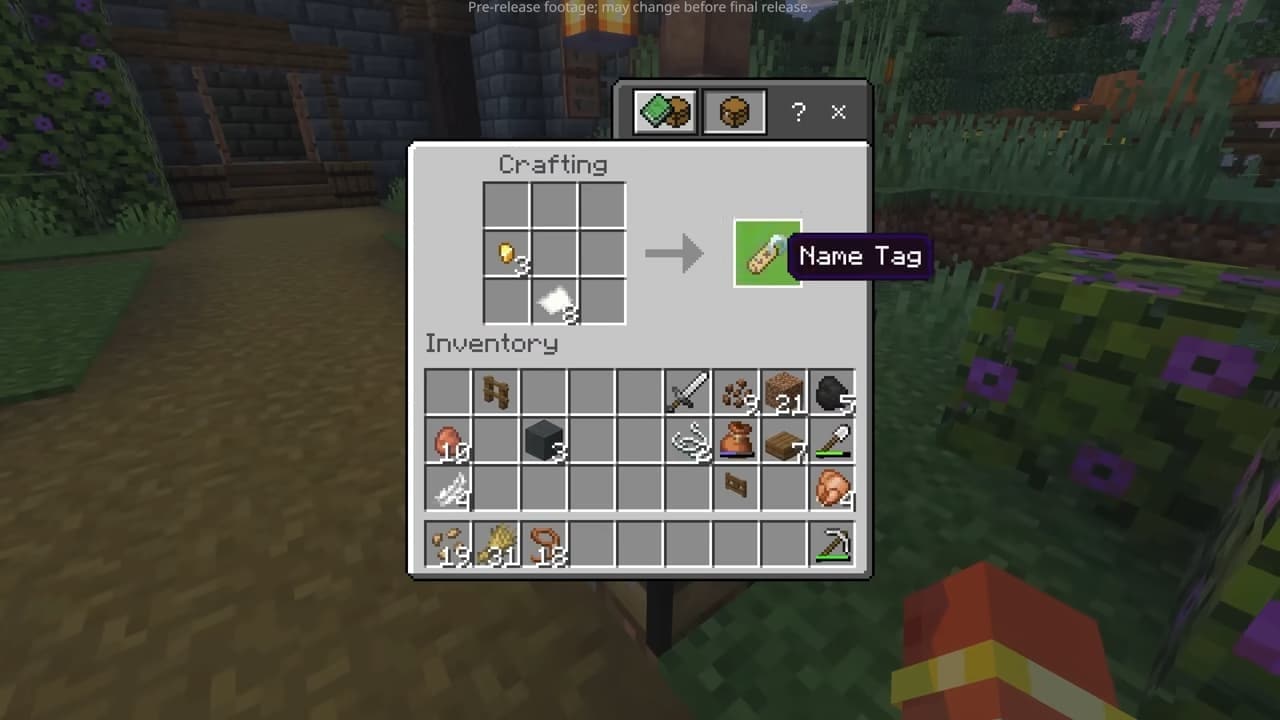
Now you can craft a Name Tag as soon as you have the materials. It makes naming pets, mobs, and farm animals a normal part of progression instead of a side quest.
Baby Mobs Are Easier to Read at a Glance
Baby animals actually look like babies now. The shapes are clearer, and it’s easier to tell them apart from adults.
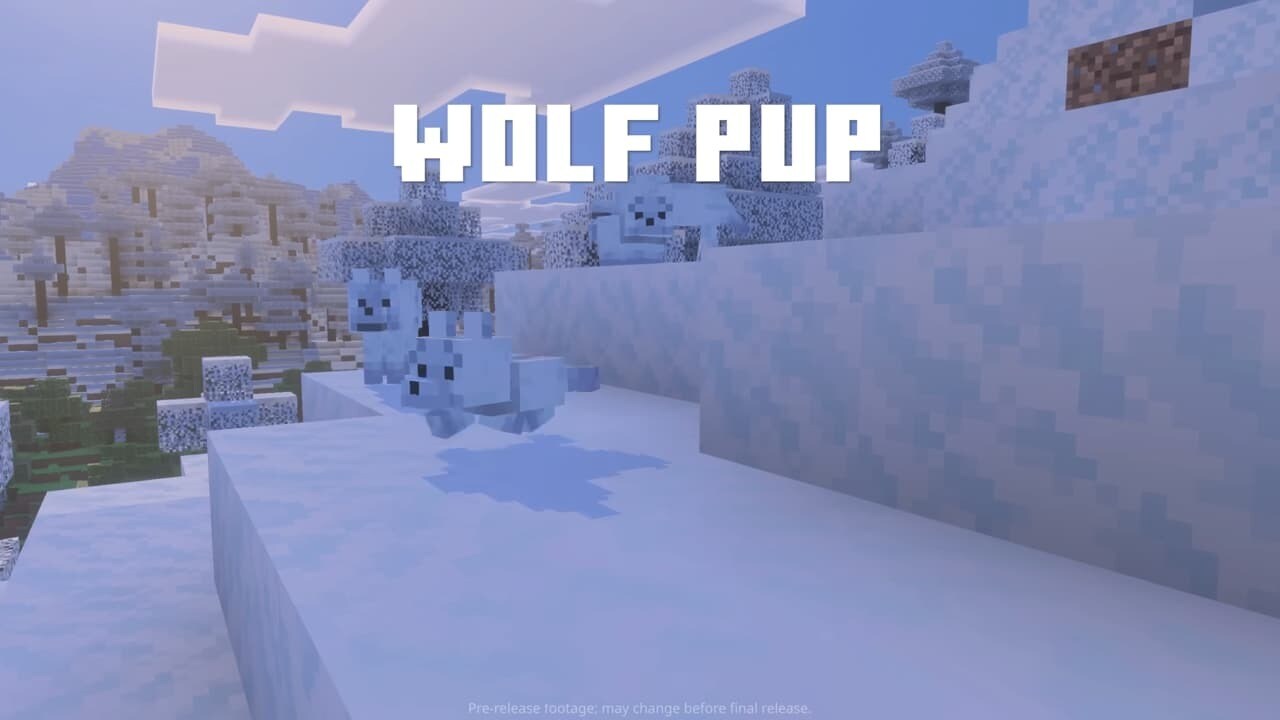
They even got new sounds: Wolves, Cats, and Pigs all make different noises when they’re young. It’s a small thing, but it makes early gameplay feel nicer.
Remember This Is Still a Test Build
This is a test version of Minecraft Java. Features in snapshots can be changed or removed before release. If you try this snapshot, back up your worlds first. Use a separate folder or installation to avoid damaging your main saves.
What You Need to Do to Try the Snapshot
Open the Minecraft Launcher. Go to the Installations tab and turn on Snapshots.
Create a new installation and select 26.1 Snapshot 2. Back up your worlds or use a separate folder. Report bugs through the official Minecraft issue tracker.
Wrap-Up
This update focuses on practical improvements rather than big headline features. Craftable Name Tags remove an old early game hassle and give you control sooner.
Baby mobs now look and sound more distinct, which makes farming and breeding easier to read. On the technical side, memory handling gets an upgrade, helping the game run more smoothly with higher RAM limits.
None of these changes redefine how you play, but together they make the game feel smoother and more consistent. Which one do you notice the most once you start a new world?