
Advertisement
SPONZOROVÁNO
fpsVR
Utility for SteamVR for keeping track of FPS, frame time and other performance metrics in the in-game overlay. Easily change SteamVR settings in the fpsVR settings overlay in the SteamVR dashboard. Headset cable twist tr...
Čtěte více- Loading...
- Loading...
- Loading...
- Loading...
- Loading...
- Loading...
Nejlepší cena
3.90 USD
Cena s G2A Plus
3.67 USD
fpsVR Porovnání cen
Seřadit podle
fpsVR PC
- PlatformaSteam
- TypDárek
- RegionGLOBÁLNÍ
Lze aktivovat v: Česká republikaNABÍDKA OD 1 PRODEJCE4.19 USD4.48 USDfpsVR PC
- PlatformaSteam
- TypDárek
- RegionEVROPA
Lze aktivovat v: Česká republikaNABÍDKA OD 1 PRODEJCE4.19 USD4.48 USDfpsVR PC
- PlatformaSteam
- TypDárek
- RegionROW
Lze aktivovat v: Česká republikaNABÍDKA OD 1 PRODEJCE4.19 USD4.48 USDfpsVR PC
- PlatformaSteam
- TypDárek
- RegionSEVERNÍ AMERIKA
Nelze aktivovat v: Česká republikaNABÍDKA OD 1 PRODEJCE3.90 USD4.48 USD
4 z 4 položek
Advertisement
SPONZOROVÁNO
OfpsVR
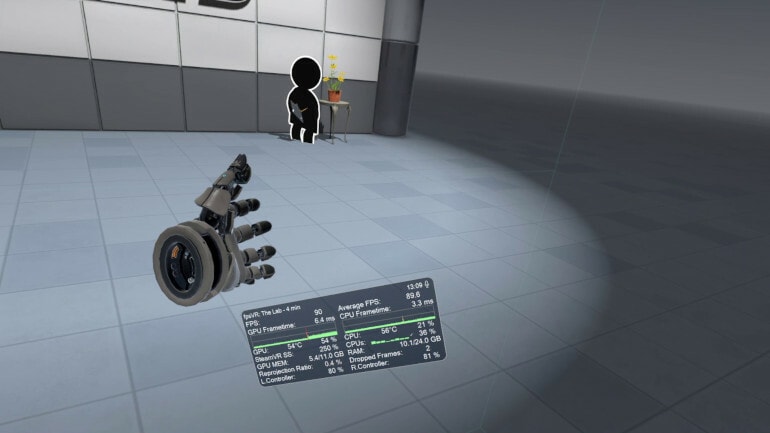
Utility for SteamVR for keeping track of FPS, frame time and other performance metrics in the in-game overlay. Easily change SteamVR settings in the fpsVR settings overlay in the SteamVR dashboard. Headset cable twist tracking and other useful features.
Features include:
- Display of the current FPS and the average FPS for VR session
- Display of the GPU & CPU usage (and Max CPU/Thread Usage - the maximum instantaneous usage among all threads/cores in the system)
- Display of the GPU MEM & RAM usage
- Display of the GPU & CPU frametimes
- Display of the GPU temperature and CPU temperature (Experimental feature)
- Display of the Ratio of reprojected frames to presented frames, Display of the number of dropped frames
- Display of the current time and duration of the VR session
- Display the batteries charge of the controllers (and Vive trackers) in percentages.
- Ability to set default playback and record devices, ability to mute/unmute the microphone using VR headset proximity sensor, ability to change Steam VR audio settings
- SteamVR Supersampling settings & Motion Smoothing settings
- Сable tracking feature.
- Display the status of the microphone, microphone control: mute / unmute
- Ability to change the size and the opacity of the overlay window, Ability to attach the overlay window to the controllers, Ability to hide the overlay window
- Center marker - displays a marker that represents the center of the playspace.
- Ability to attach the overlay window for seated positions in seated games/apps (for auto/flight-sims)
- Automatically start fpsVR when SteamVR starts (optional), Automatically minimize the window after start (optional)
- Hide the window to Windows tray in minimized state (optional)
- Ability to reset statistics at any time for benchmarking/testing
- Ability to save the history of VR sessions and view it in the fpsVR History Viewer (included)
- Timer, Alarm.
Recenze
Podívejte se, co si o tomto titulu myslí naši zákazníciPro tento produkt zatím nejsou žádné recenze.
Napište první recenzi a získejte 5% slevu na svůj další nákupPřihlášení zákazníci s alespoň 1 nákupem mohou psát recenze
Připojte se k Plus Free a získejte 11% slevu, kterou můžete hned využít
Výběrem možnosti Přihlásit se a připojit se souhlasíte se zasíláním marketingových e-mailů od společnosti G2A.COM Limited o nabídkách, akcích a slevách. Odběr můžete kdykoli zrušit.