
Advertisement
SPONSORED
fpsVR
Utility for SteamVR for keeping track of FPS, frame time and other performance metrics in the in-game overlay. Easily change SteamVR settings in the fpsVR settings overlay in the SteamVR dashboard. Headset cable twist tr...
Read more- Loading...
- Loading...
- Loading...
- Loading...
- Loading...
- Loading...
Best price
5.36 USD
Price with G2A Plus
5.36 USD
fpsVR Price Comparison
Sort by
fpsVR PC
- PlatformSteam
- TypeGift
- RegionGLOBAL
Can activate in: United StatesOFFER FROM 1 SELLER6.38 USD- 5.36 USD
fpsVR PC
- PlatformSteam
- TypeGift
- RegionEUROPE
Can't activate in: United StatesOFFER FROM 1 SELLER6.38 USDfpsVR PC
- PlatformSteam
- TypeGift
- RegionROW
Can activate in: United StatesOFFER FROM 1 SELLER6.38 USD
4 out of 4 items
Advertisement
SPONSORED
About fpsVR
Utility for SteamVR for keeping track of FPS, frame time and other performance metrics in the in-game overlay. Easily change SteamVR settings in the fpsVR settings overlay in the SteamVR dashboard. Headset cable twist tracking and other useful features.
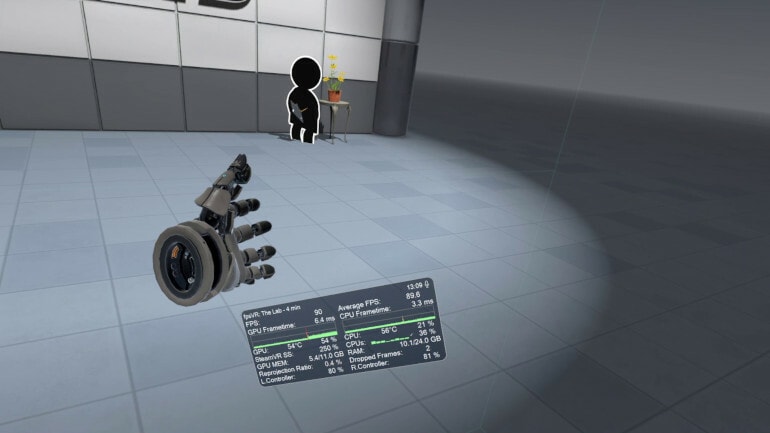
Features include:
- Display of the current FPS and the average FPS for VR session
- Display of the GPU & CPU usage (and Max CPU/Thread Usage - the maximum instantaneous usage among all threads/cores in the system)
- Display of the GPU MEM & RAM usage
- Display of the GPU & CPU frametimes
- Display of the GPU temperature and CPU temperature (Experimental feature)
- Display of the Ratio of reprojected frames to presented frames, Display of the number of dropped frames
- Display of the current time and duration of the VR session
- Display the batteries charge of the controllers (and Vive trackers) in percentages.
- Ability to set default playback and record devices, ability to mute/unmute the microphone using VR headset proximity sensor, ability to change Steam VR audio settings
- SteamVR Supersampling settings & Motion Smoothing settings
- Сable tracking feature.
- Display the status of the microphone, microphone control: mute / unmute
- Ability to change the size and the opacity of the overlay window, Ability to attach the overlay window to the controllers, Ability to hide the overlay window
- Center marker - displays a marker that represents the center of the playspace.
- Ability to attach the overlay window for seated positions in seated games/apps (for auto/flight-sims)
- Automatically start fpsVR when SteamVR starts (optional), Automatically minimize the window after start (optional)
- Hide the window to Windows tray in minimized state (optional)
- Ability to reset statistics at any time for benchmarking/testing
- Ability to save the history of VR sessions and view it in the fpsVR History Viewer (included)
- Timer, Alarm.
Reviews
Check what our customers think of this titleThere are no reviews for this item yet
Add the first review and get a 5% discount for your next purchaseSigned-in customers with at least 1 purchase can review
Join Plus Free and get an 11% discount to use right away
By selecting Sign in and join, you agree to receive marketing emails from G2A.COM Limited about deals, promotions, and discounts. You can unsubscribe anytime.