



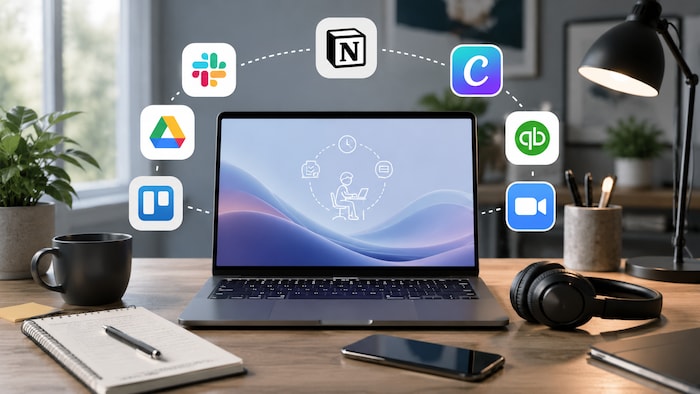
Freelancing in 2026 is no longer just a laptop and email.
It is about running a solo business and working smarter, because everything moves fast now and messy systems show immediately.
Freelancers need a simple software stack that improves workflow efficiency and delivers real time savings by reducing admin work and improving communication. Small inefficiencies add up quickly and take time away from real work.
A good freelancer stack also needs to protect business data, because one mistake can create serious problems – and that stress is avoidable.
The best tools reduce app switching and use AI to speed up work. Less switching means more focus, better output, and a more professional client experience.
Quick Summary – Top Freelancer Programs 2026
Table of Contents
How We Choose These Programs
We prepared this list of top freelancer programs 2026 based on everyday use, not just feature lists or brand popularity.
The focus was on tools that help freelancers with the most common parts of solo business work:
- Planning tasks
- Communicating with clients
- Managing meetings
- Creating content
- Writing proposals, emails, and documents
- Scheduling work
- Handling invoices
- Keeping business data secure






Spotify
Spotify helps freelancers relax and reset between work sessions. It is not a direct work tool, but it can help maintain focus and prevent burnout during long workdays.
Best for: freelancers working long hours who need mental resets between tasks.
Standout 2026 feature: AI-personalized playlists based on your focus and mood in real time.
How it saves time: it helps reduce burnout and keeps productivity more stable across the day.
Real use case: taking a 10-15 minute break after client work before moving into invoices, emails, or admin tasks.
Limitation: it can turn into a distraction if breaks are not controlled.
Antivirus: Bitdefender / Windows Defender
Antivirus software protects your device from malware, phishing, and unsafe files. For freelancers, this matters because one bad file can cost you a client or interrupt paid work.
Best for: freelancers handling client files, emails, downloads, or payments daily.
Standout 2026 feature: AI threat detection that spots risks instantly.
How it saves time: it helps avoid downtime, device recovery, and emergency damage control.
Real use case: blocking a fake invoice before it causes financial or data damage.
Limitation: occasional false alerts or slower performance on older devices.
VPN: NordVPN or ExpressVPN
A VPN encrypts your internet connection and protects your online activity from third parties. It is mainly used for privacy and secure remote work.
Best for: freelancers working remotely, traveling, or using public networks.
Standout 2026 feature: smart routing that encrypts only sensitive apps like banking, email, or client portals.
How it saves time: it helps avoid security issues while working outside your usual setup.
Real use case: sending contracts safely from a cafe, hotel, airport, or coworking space.
Limitation: it may slightly reduce internet speed.
Canva AI
Canva AI helps freelancers produce professional visual assets quickly, even without a dedicated design team.
Best for: freelancers who need fast visual branding for clients, social media, presentations, and proposals.
Standout 2026 feature: AI brand kits that generate full visual identities.
How it saves time: it helps create polished designs in minutes instead of hours.
Real use case: making social media posts, pitch decks, client proposals, and simple branded assets quickly.
Limitation: it offers less control for advanced or fully custom design work.
Dropbox Dash and Backup
Dropbox supports cloud collaboration by allowing freelancers to store, share, and recover files across devices. It also helps protect freelancers from losing important project data.
Best for: freelancers managing long-term client projects and large file libraries.
Standout 2026 feature: AI-powered version recovery and smart file search.
How it saves time: it can restore lost work quickly without major project disruption.
Real use case: recovering a full client project after a laptop crash.
Limitation: subscription cost and reliance on stable internet.
Google Workspace AI or Grammarly AI
Google Workspace AI and Grammarly AI support writing, planning, communication, and repetitive task automation. They act as practical writing assistants for freelancers.
Best for: freelancers writing emails, proposals, reports, and content every day.
Standout 2026 feature: AI that drafts, edits, and summarizes across apps.
How it saves time: it reduces repetitive writing and communication tasks.
Real use case: generating a proposal, follow-up email, and client summary in minutes.
Limitation: human review is still required to ensure accuracy, context, and the right tone.
Slack or Zoom AI
Slack and Zoom AI centralize messaging, meetings, updates, and collaboration in one place. They help freelancers stay organized and responsive when working with several clients.
Best for: freelancers managing multiple clients, meetings, and active conversations.
Standout 2026 feature: AI meeting summaries with action points.
How it saves time: it removes manual note-taking and makes follow-ups faster.
Real use case: sending instant meeting recaps after client calls.
Limitation: communication can still become fragmented if different clients use different tools.
QuickBooks Solopreneur
QuickBooks Solopreneur works as invoicing software for freelancers, handling expense tracking, taxes, and payments in one place.
It helps freelancers stay financially organized, get paid on time, and improve client retention through smooth billing.
Best for: freelancers handling multiple clients and irregular income in digital services.
Standout 2026 feature: AI-generated invoices with automatic tax handling.
How it saves time: it automates invoicing and payment tracking.
Real use case: sending invoices in seconds and tracking overdue payments automatically.
Limitation: setup can feel complex, especially for international work.
Best Software For Freelancers By Task
To make choosing easier, here is a quick breakdown of the must-have apps for self-employed professionals. It also works as a simple software comparison to help you choose the right tools based on your needs.
Why It Matters In 2026
Freelancing in 2026 is faster and more demanding, with clients expecting quick, professional results even from solo freelancers.
At the same time, there is less space for slow workflows or scattered remote work tools.
That is why software has shifted from separate apps to connected systems powered by AI productivity, app integrations, and admin automation.
Instead of juggling tools, freelancers now rely on stacks that automate writing, client communication, payments, and organization – so they can focus on real client work, not admin.
Conclusion
There is no perfect freelancer stack, but the best ones combine planning, communication, finance, scheduling, content creation, and security into one connected system.
The real value comes from choosing tools that work together, not separately.
Test, compare, and build a stack that fits your workflow, whether you are a designer, writer, developer, marketer, or consultant.