

Parallels Desktop 26
Parallels Desktop 26 Price Comparison
Parallels Desktop 26 - MAC 1 Device 2 Years
- PlatformParallels
- TypeKey
- RegionGLOBAL
Can activate in: United StatesOFFERS FROM 0 SELLERSOut of stock
3 out of 3 items
About Parallels Desktop 26
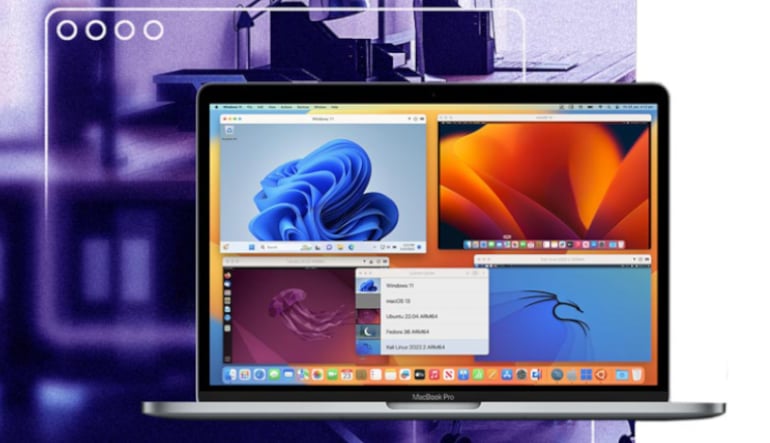
Parallels Desktop 26 lets you run Windows 11, Linux, and thousands of Windows applications on a Mac without rebooting. It offers seamless macOS integration, support for macOS Tahoe 26, and tools for work, development, testing, and entertainment.
Parallels Desktop 26 Key Features
- Run Windows 11 applications alongside native macOS applications without restarting your Mac.
- Support for macOS Tahoe 26 and compatibility with Windows 11 25H2.
- Microsoft-authorized solution for running Windows 11 on Apple silicon Macs.
- Compatibility with Apple silicon and supported Intel-based Mac computers.
- Coherence mode displays Windows applications directly on the macOS desktop.
- Shared folders, clipboard content, files, and drag-and-drop functionality between macOS and Windows.
- Access to Mac hardware such as the camera, microphone, display, keyboard, trackpad, printers, and USB devices from Windows.
- Support for Windows, Linux, and macOS virtual machines.
- DirectX and OpenGL 3D acceleration for compatible applications and games.
- Accurate Mac storage visibility inside Windows virtual machines.
Run Windows Applications Without Rebooting
Parallels Desktop 26 allows Windows and macOS applications to operate simultaneously on one Mac. Users can open business tools, engineering programs, educational applications, development environments, and compatible Windows games without switching devices or restarting the computer.
The software simplifies Windows 11 installation and configuration, making it easier to create a virtual machine and begin using Windows applications. It can provide access to Windows-only programs such as Microsoft Access, Power BI, Visio, Project, Visual Studio, QuickBooks, and many other professional tools.
Seamless Integration Between Windows and macOS
Coherence mode hides the traditional Windows desktop and places Windows applications next to native Mac applications. This creates a more unified workspace where programs from both operating systems can be opened and managed together.
Users can drag and drop files or images between applications, share clipboard content, access Mac folders from Windows, and open compatible files using either Mac or Windows software. Shared user folders can also reduce unnecessary file duplication and help save storage space.
Optimized for macOS Tahoe 26
Parallels Desktop 26 includes under-the-hood improvements designed to support macOS Tahoe 26. Updated background-process handling helps essential functionality, including setup procedures and Coherence mode, continue operating correctly under the operating system’s process restrictions.
Windows virtual machines can accurately identify the storage space available on the host Mac. This helps users manage large installations and disk-intensive workloads while reducing the risk of performance problems caused by insufficient storage.
Virtual Machines for Work and Development
In addition to Windows 11, Parallels Desktop 26 can run supported Linux distributions and macOS virtual machines. This makes it useful for testing software, maintaining separate work environments, studying operating systems, checking cross-platform compatibility, and working with tools unavailable on macOS.
Developers and technical users can build isolated environments for coding, debugging, automation, network testing, and legacy application maintenance. Supported editions also offer expanded processing resources, command-line functionality, multiple virtual machines, and tools for demanding professional workflows.
Who will like Parallels Desktop 26
- Mac users who need Windows-only applications without purchasing a separate computer.
- Professionals using Microsoft Access, Power BI, Visio, Project, QuickBooks, or specialized business software.
- Developers who test applications across Windows, Linux, and macOS environments.
- Engineers, designers, and analysts who depend on compatible Windows-based technical software.
- Students who need Windows applications required by their school or university.
- IT teams managing Windows virtual machines on company-owned Macs.
- Power users who want to run multiple operating systems from one computer.
- Mac gamers interested in playing supported Windows titles.