
Ashampoo Photo Optimizer 10
Ashampoo Photo Optimizer 10 - When your photos just need to be better
- Loading...
- Loading...
- Loading...
- Loading...
- Loading...
- Loading...
Ashampoo Photo Optimizer 10 Fiyat Karşılaştırması
Ashampoo Photo Optimizer 10 - 1 Cihaz Ömür boyu
- PlatformAshampoo
- TürAnahtar
- BölgeKÜRESEL
Şurada etkinleştirilebilir: Türkiye6 SATICIDAN TEKLİFLER14.43 CZK976.97 CZK
1 1 öğeden
Ashampoo Photo Optimizer 10 hakkında
Ashampoo Photo Optimizer 10 is an easy-to-use photo editor for automatic image enhancement, batch processing, perspective correction, portrait retouching, creative LUT effects, and detailed manual adjustments.
Ashampoo Photo Optimizer 10 Key Features
- One-click automatic photo optimization
- Batch processing for multiple images
- Support for lookup tables and over 30 built-in LUTs
- Horizontal and vertical perspective correction
- Customizable Favorites menu for frequently used tools
- Manual white balance and color temperature controls
- Tonal curve, brightness, contrast, saturation, and gamma adjustments
- Image cropping, rotating, resizing, and straightening
- Red-eye correction, teeth whitening, and portrait retouching
- Clone tool for removing stains and minor imperfections
- Noise reduction, sharpening, and softening tools
- Watermarks, frames, artistic effects, and printing options
- 64-bit optimization and improved memory management
Enhance Photos With One Click
Ashampoo Photo Optimizer 10 analyzes each image and automatically adjusts important visual properties to improve its overall appearance. The automatic optimization feature can enhance colors, contrast, lighting, and clarity without requiring detailed knowledge of professional photo-editing techniques.
Batch processing allows the same improvements to be applied to multiple images at once. This makes the software particularly useful when editing entire collections of vacation photos, party pictures, event images, or other large photo sets.
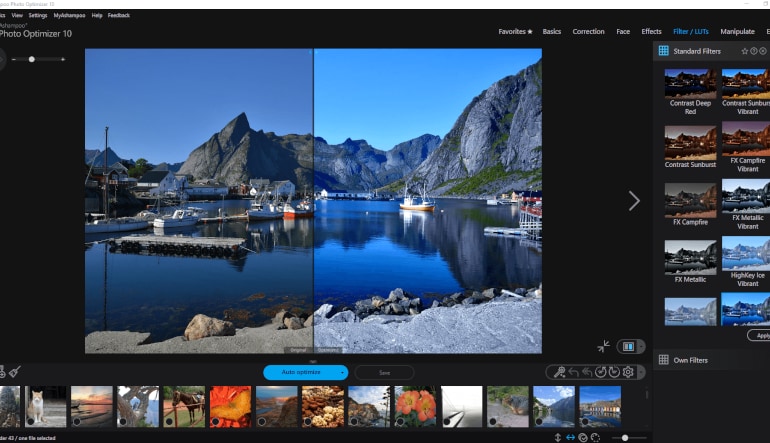
Create Consistent Looks With LUT Effects
The software supports lookup tables, commonly known as LUTs, which can modify several color, brightness, and saturation values simultaneously. More than 30 professionally designed LUTs are included, providing a quick way to give photos warmer, cooler, more colorful, or more cinematic appearances.
Users can also import compatible LUTs obtained from other sources. Applying the same LUT to a series of images helps create a consistent visual style across albums, social media photos, creative projects, and presentation materials.
Correct Perspective and Composition
Ashampoo Photo Optimizer 10 includes tools for correcting horizontal and vertical perspective distortions. Buildings, horizons, and other straight lines can be adjusted when they appear tilted or distorted because of the camera angle.
Essential editing functions such as cropping, rotating, resizing, mirroring, and straightening make it easier to improve image composition. Frequently used tools can be added to the customizable Favorites menu for faster access during repeated editing tasks.
Refine Colors and Image Details
For users who prefer greater control, the software provides manual adjustments for white balance, color temperature, brightness, contrast, saturation, gamma, and tonal curves. These tools can help correct unwanted color casts, restore detail, and improve images that appear flat, dark, or washed out.
Additional tools support noise reduction, sharpening, and selective softening. Users can therefore make quick automatic improvements or fine-tune individual image properties according to their preferences.
Improve Portraits and Remove Imperfections
Portrait-editing functions help correct common problems while preserving a natural appearance. Users can remove red eyes, whiten teeth, and improve facial areas through automatic or manual adjustments.
The clone tool can cover stains, skin imperfections, sensor marks, and other small distractions by copying pixels from another part of the image. This provides an accessible way to clean up portraits and everyday photographs without using a complex professional editor.
Who Will Like Ashampoo Photo Optimizer 10
- Home users looking for quick and uncomplicated photo enhancement
- Beginners who want strong results without learning complex editing software
- Photographers who need to optimize many images through batch processing
- Social media users creating visually consistent photo collections
- Travelers improving vacation, landscape, and city photographs
- Families editing portraits, celebrations, weddings, and party pictures
- Creative users experimenting with LUTs, frames, and artistic effects
- Anyone who needs practical tools for correcting color, perspective, and minor imperfections