
CorelDRAW Technical Suite 2021
CorelDRAW Technical Suite 2021 Price Comparison
CorelDRAW Technical Suite 2021 - PC 2 Devices Lifetime
- PlatformCorel
- TypeKey
- RegionGLOBAL
Can activate in: United StatesOFFERS FROM 4 SELLERS0.81 USDCorelDRAW Technical Suite 2021 - PC 1 Device Lifetime
- PlatformCorel
- TypeKey
- RegionGLOBAL
Can activate in: United StatesOFFERS FROM 4 SELLERS0.83 USD


2 out of 2 items
About CorelDRAW Technical Suite 2021
CorelDRAW Technical Suite 2021 is technical illustration and drafting software for creating precise documentation, diagrams, spare parts pages, and visual communication assets from 2D, 3D, CAD, image, and data sources.
CorelDRAW Technical Suite 2021 Key Features
- Professional technical illustration and documentation tools for detailed visual communication.
- Corel DESIGNER for accurate technical drawings, isometric designs, callouts, and dimensioning.
- CorelDRAW for vector illustration, page layout, and marketing-ready graphics.
- Corel PHOTO-PAINT for photo editing and image enhancement within technical projects.
- XVL Studio Corel Edition for repurposing 3D models and engineering data.
- Support for technical publishing and design formats, including CGM, WebCGM, 3D PDF, SVG, DWG, EPS, TIFF, PNG, and JPEG.
- Tools for creating spare parts pages, assembly instructions, schematics, manuals, and floor plans.
- Collaboration features for collecting comments, annotations, and stakeholder feedback.
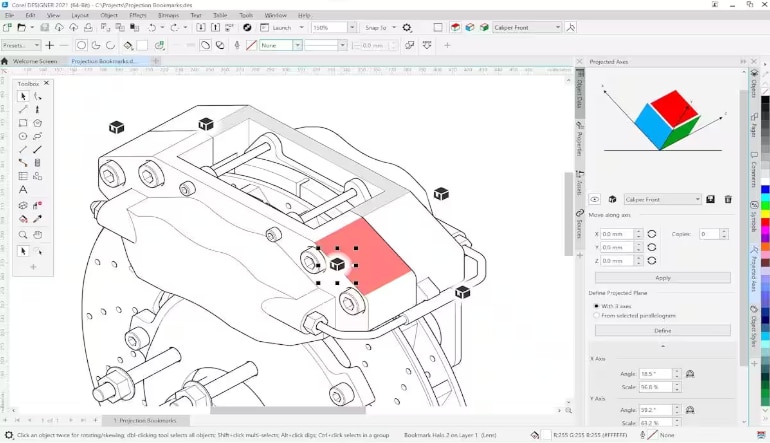
Precise Technical Illustration and Documentation
CorelDRAW Technical Suite 2021 gives professionals a dedicated workspace for producing accurate technical visuals. It is built for projects that require clarity and precision, such as schematics, maintenance manuals, floor plans, parts illustrations, and detailed product documentation.
Turn 3D and CAD Data into Clear Visuals
The suite helps users repurpose engineering data and 3D models into understandable technical illustrations. With XVL Studio Corel Edition, users can bring 3D views into their documentation workflow and use them as a foundation for accurate visual assets, saving time when working with existing design data.
Complete Creative Toolkit for Technical Communication
Beyond technical drawing, CorelDRAW Technical Suite 2021 includes tools for layout design, vector graphics, image editing, font management, and screen capture. This makes it useful for teams that need to create both technical documentation and polished marketing or sales materials from the same visual assets.
Better Workflow for Spare Parts Pages and Manuals
The software supports workflows for creating spare parts pages, assembly instructions, and rich technical documents. Users can combine illustrations with specifications, data tables, linked design files, and interactive SVG output to make technical information easier to read, share, and publish online.
Who will like CorelDRAW Technical Suite 2021
- Technical illustrators creating precise drawings and documentation.
- Engineers and manufacturing teams preparing visual instructions or parts catalogs.
- Technical writers building manuals, schematics, and maintenance documents.
- Architects and design professionals working with plans, diagrams, and technical layouts.
- Marketing teams that need to turn technical product visuals into brochures, web graphics, packaging, or sales materials.
- Companies that work with 2D, 3D, CAD, image, and data files in one documentation workflow.