
YouTube Gift Card – Redeem Guide
- Sign in to the Google Account you want to use to redeem the gift card.
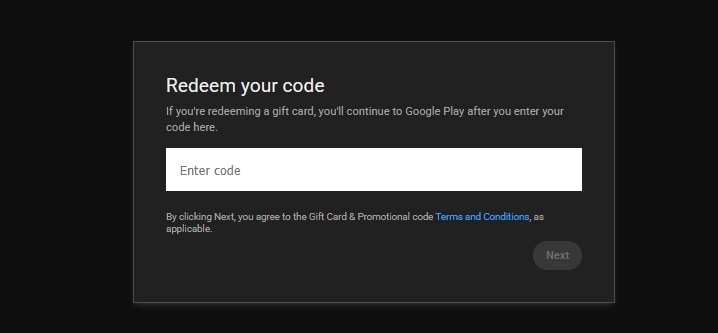
- Visit the URL listed on your gift card or go to https://www.youtube.com/redeem.
- Enter the gift card code.
- Click Next.
- Choose what you’d like to buy, if you want to use your balance right away.
- Select Google Play balance as your payment method.
- Click Buy to complete the transaction.
YouTube PREMIUM ACCOUNT ACTIVATION GUIDE with Login and Password
- Log in to your account using the details you received either directly or through an external website.
- Check if your account is valid for the advertised subscription period.
- Change password, as well as add Two-factor authentication (2FA) to claim the account.
Notice! It's recommended to do not change country settings of the purchased Account, because it may lead to changes of the subscription type.
Popular guides
- Adobe Code Activation
- Avast Antivirus Code Activation
- GOG.COM Game Key Activation
- EA / Origin Cash Card Activation
- Epic Games Code Activation
- Battle.net Code Activation
- G2A PLUS Key Activation
- Google Play Code Activation
- Grand Theft Auto V (Rockstar Game Launcher) Activation
- IL-2 Sturmovik Activation