
RIOT POINTS ACTIVATION GUIDE
NOTE: This instruction includes the following sections:
League of Legends ACTIVATION GUIDE
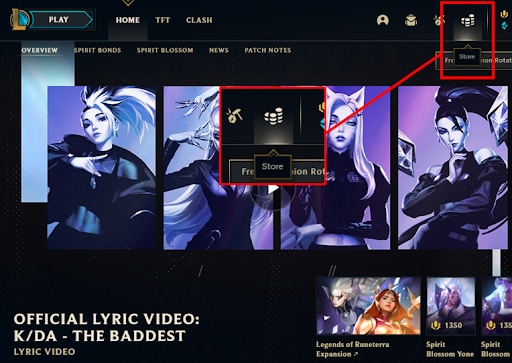
- Log into one of our Game clients on your PC
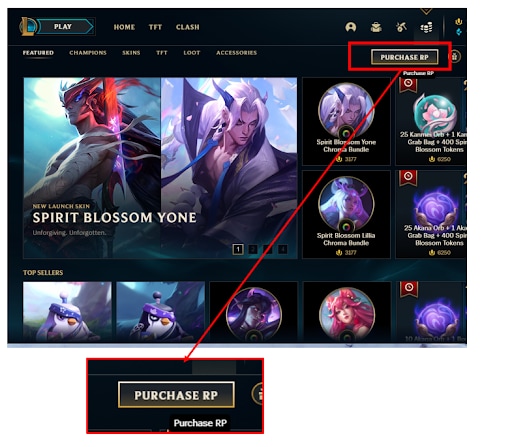
- Go to the store and click "Purchase RP/VP/Coins".
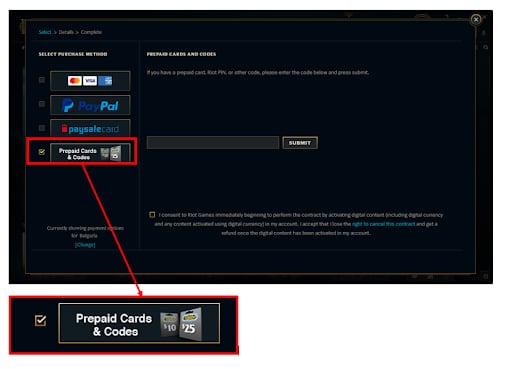
- Select the "Prepaid Cards" payment method.
- Enter the pin code from your receipt. Do NOT include any spaces when you type the code, as our system will identify it as invalid.
- Press the submit button to complete the transaction. Enjoy your in-game currency!

Valorant ACTIVATION GUIDE
- Log into the VALORANT game client.
- Click on the VALORANT icon located to the right of the Store tab.
- Select Prepaid Cards & Codes.
- Input the code provided for your card.
- Press Submit.
- Enjoy your VALORANT Points!
Popular guides
- Adobe Code Activation
- Avast Antivirus Code Activation
- GOG.COM Game Key Activation
- EA / Origin Cash Card Activation
- Epic Games Code Activation
- Battle.net Code Activation
- G2A PLUS Key Activation
- Google Play Code Activation
- Grand Theft Auto V (Rockstar Game Launcher) Activation
- IL-2 Sturmovik Activation