
Battle.net Game Key Activation
Checkout how to activate a game key on Blizzard Battle.net.
- Login to your Battle.net Account

- Click on your account name in the top right and select "Account Settings"

- Click the green "Add a Game Key" button on the right

- Enter your code and click "Redeem Code"
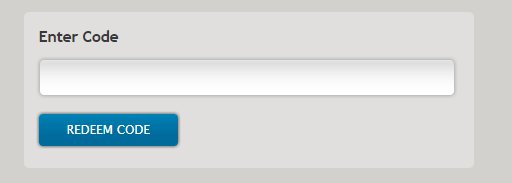
- Confirm the product by clicking "Continue" (optional)

- OFERTĂ DE LA 1 VÂNZĂTOR
World Of Warcraft: Dragonflight Epic Edition PC
- Battle.net
- •Cheie
- •AMERICA DE NORD
286.57 RON480.10 RON - OFERTE DE LA 2 VÂNZĂTORI
- OFERTE DE LA 3 VÂNZĂTORI
Diablo 2 PC
- Battle.net
- •Cheie
- •GLOBAL
67.83 RON75.18 RON - OFERTE DE LA 10 VÂNZĂTORI
StarCraft: Remastered PC
- Battle.net
- •Cheie
- •GLOBAL
36.13 RON80.03 RON

- OFERTE DE LA 27 VÂNZĂTORI
- OFERTE DE LA 27 VÂNZĂTORI
- OFERTE DE LA 27 VÂNZĂTORI
Blizzard GiftCard 50 USD
- Battle.net
- •Cheie
- •Doar pentru moneda USD
241.35 RON266.75 RON - OFERTE DE LA 19 VÂNZĂTORI




TOP Platforme de Jocuri
Ai un buget limitat sau vrei doar să găsești o ofertă grozavă? G2A oferă o selecție de jocuri video excelente pentru toate platformele majore de jocuri!
Advertisement
SPONSORIZAT
Ghiduri populare

Advertisement
SPONSORIZAT