
Bitsa Coupon – Redeem Guide
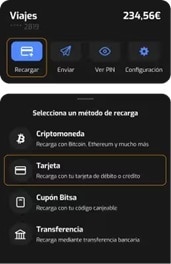
- Open the Bitsa app and go to the “Recharges” section.
- Select “Coupons”.
- Enter your coupon code.
- In a few seconds, your recharge will be confirmed and added to your balance.
If you need help redeeming the coupon, contact customer support at support@bitsacards.com or visit the Bitsa help center online.
More information: Bitsacard
Important information:
- This top-up is non-refundable.
- Cannot be exchanged for cash, resold, or exchanged.
- All terms and conditions apply: www.bitsacard.com/terminos-ycondiciones
- Expires 3 months from the date of purchase.
Popular guides
- Adobe Code Activation
- Avast Antivirus Code Activation
- GOG.COM Game Key Activation
- EA / Origin Cash Card Activation
- Epic Games Code Activation
- Battle.net Code Activation
- G2A PLUS Key Activation
- Google Play Code Activation
- Grand Theft Auto V (Rockstar Game Launcher) Activation
- IL-2 Sturmovik Activation




 et 200+ autres
Installer l'application G2A
Profitez des offres spéciales sur les jeux où que vous soyez!
4.4 - 55,900 votes

G2A.COM Limited (opérateur de la plate-forme)
Address: 31/F, Tower Two, Times Square, 1
Matheson Street
Causeway Bay, Hong Kong
Numéro d'enregistrement de l'entreprise : 63264201
G2A LLC (opérateur de plateforme)
Address: 701 South Carson Street, Suite 200, Carson City,
Nevada 89701, USA
Numéro d'enregistrement de l'entreprise : E0627762014-7
G2A.COM Direct B.V. (platform support)
Addres: James Wattstraat 77 A 3, 1097DL Amsterdam,
Pays-Bas,
Numéro d'enregistrement de l'entreprise : 89975561


L'utilisation de la plateforme G2A.COM implique l'acceptation des conditions générales de G2A. Des informations sur la manière dont nous traitons vos données à caractère personnel peuvent être trouvées dans la Politique en matière de confidentialité et de cookies. Copyright © Groupe G2A. Tous droits réservés.