
Battle.net Game Key Activation
Checkout how to activate a game key on Blizzard Battle.net.
- Login to your Battle.net Account

- Click on your account name in the top right and select "Account Settings"

- Click the green "Add a Game Key" button on the right

- Enter your code and click "Redeem Code"
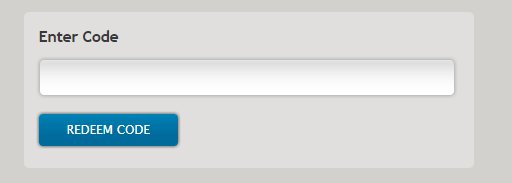
- Confirm the product by clicking "Continue" (optional)

- AANBOD VAN 1 VERKOPER
- AANBIEDINGEN VAN 2 VERKOPERS
- AANBIEDINGEN VAN 3 VERKOPERS
Diablo 2 PC
- Battle.net
- •Sleutel
- •GLOBAL
12.04 EUR13.38 EUR - AANBIEDINGEN VAN 10 VERKOPERS
StarCraft: Remastered PC
- Battle.net
- •Sleutel
- •GLOBAL
6.40 EUR15.00 EUR
- AANBIEDINGEN VAN 27 VERKOPERS
Blizzard Gift-Card 20 EUR
- Battle.net
- •Sleutel
- •Alleen voor EUR-valuta
19.67 EUR20.00 EUR - AANBIEDINGEN VAN 27 VERKOPERS
Blizzard Gift Card 50 EUR
- Battle.net
- •Sleutel
- •Alleen voor EUR-valuta
49.00 EUR50.00 EUR - AANBIEDINGEN VAN 27 VERKOPERS
Blizzard GiftCard 50 USD
- Battle.net
- •Sleutel
- •Alleen voor USD
44.14 EUR50.00 EUR - AANBIEDINGEN VAN 19 VERKOPERS




TOP Gameplatforms
Heb je weinig geld of wil je gewoon een geweldige deal scoren? G2A biedt een selectie geweldige videogames voor alle grote gamingplatforms!
Advertisement
GESPONSORD
Populaire handleidingen
- Adobe Code-activering
- Avast Antivirus Code-activering
- GOG.COM game key-activering
- EA / Origin Cash Card-activering
- Epic Games Code-activering
- Battle.net Code-activering
- G2A PLUS Key-activering
- Google Play Code-activering
- Grand Theft Auto V (Rockstar Game Launcher)-activering
- IL-2 Sturmovik-activering

Advertisement
GESPONSORD