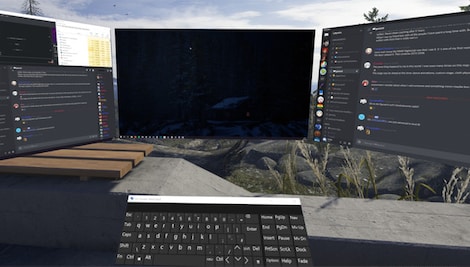
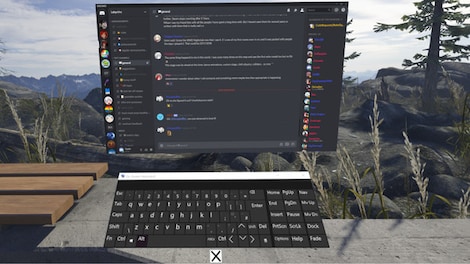
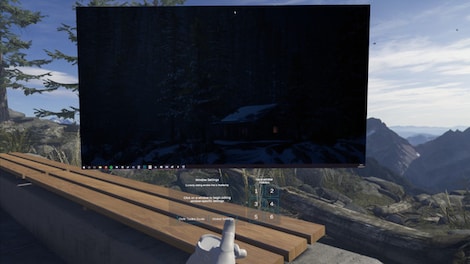
OVR Toolkit is a SteamVR Overlay utility designed to make viewing the desktop within VR easy and intuitive. OVR Toolkit allows you to display specific desktop windows, quickly select between them, use intuitive contro...
SPONSORED
Gamersuniverse
100%
Positive feedback
37423
Offers from 3 business sellers
Sort by:
Instant delivery
Plus Premium price
Regular price
Gamesguru24
99%
136
Gamesguru24
99%
Positive feedback
136
16.32 USD
18.14 USD
-10%
18.14 USD
18.14 USD
Gamersuniverse
Excellent seller
100%
37423
Gamersuniverse
Excellent seller
100%
Positive feedback
37423
17.56 USD
19.51 USD
-10%
19.51 USD
19.51 USD
Game_zone_portal
Excellent seller
100%
14969
Game_zone_portal
Excellent seller
100%
Positive feedback
14969
19.83 USD
21.98 USD
-10%
22.03 USD
22.03 USD
Each offer comes from an independent seller who sets its price, terms and conditions, and authorizes delivery and payment.
G2A.COM is not endorsed by any developer, publisher, or trademark owner of the items available on this site.
This item is an account. It comes with details you’ll use to sign in to an account on an external platform and access the content you bought.
Accounts are non-refundable
You’re responsible for how you use the account
Changing settings – e.g. the payment method or region – may block access or some features, like family sharing
You’ll get your login and password after the purchase
Details
Release Date:
June 28, 2019
Genre:
Indie
Languages
Japanese
Korean
English
Legal information
OVR Toolkit is a SteamVR Overlay utility designed to make viewing the desktop within VR easy and intuitive. OVR Toolkit allows you to display specific desktop windows, quickly select between them, use intuitive controls to navigate those windows, and use a virtual keyboard to type.
Ever wanted to reply to Discord messages without taking off your headset or looking through a nose piece? Ever wanted to pause that song you're listening to without fumbling around on your keyboard? Now you can with ease!
OVR Toolkit is compatible with mostly all SteamVR compatible headsets, though it does require tracked controllers too! The utility is being built with the Vive/Vive Pro, Valve Index, and Oculus Rift/Rift S in mind though WMR headsets are compatible too. (Compatible controllers require a trigger and grip)
Check out the feature showcase on YouTube! (Filmed on a pre-release build)
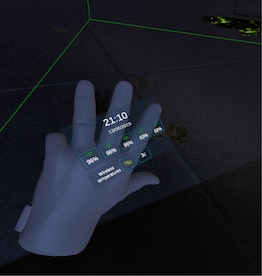
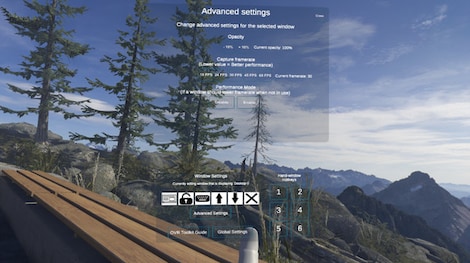
YouTube™ Video: OVR Toolkit - Pre-Release Feature Showcase Views: 396 Feature showcase for OVR Toolkit, video was filmed prior to release of the program. (Apologies for my shakiness when filming this! It was late! Features Overlays over almost all SteamVR applications: OVR Toolkit will display on top of all your favorite titles! (VRChat, Beat Saber, mostly all SteamVR titles, etc.) Desktop window viewing: Allows you to select a desktop window and display it above your hand, or pin it in the world around you. Multiple desktop windows: Create multiple different windows and place them in the world around you. Attach windows to tracked devices: You can make windows move around with either your left or right controllers, headset, or have them stationary in the world. Quick selection of desktop windows: OVR Toolkit contains a configuration 'hotkey' menu that allows you to bind buttons on its UI to switch between specific windows in one click. Intuitive desktop input: Scroll up and down on windows by dragging, make a selection by dragging, like using your finger on a phone but with a VR controller instead! (This makes a lot more sense than it sounds like it does!) Wristwatch: An overlay displayed on your hand that displays the time, date, as well as Vive/Index controller/Tracker battery percentages, as well as other values such as Vive Wireless temperatures. Saving/Loading configurations: Like that sweet setup you've made? Well now you can save it, and load it again next time you launch! Advanced settings for window capture: Really want to capture a window at 60FPS instead of 30? Want to make a window slightly transparent so it's less in the way? You can do those with our advanced settings! Important stuff you should know about We've tried our best to make OVR Toolkit support everything, but that just isn't how this world works! Please take these compatibility notes in mind before purchasing: OVR Toolkit requires being launched as admin, this is due to the inability to capture programs that are running as admin without running OVR Toolkit as admin, so it's needless to say a Windows account with admin privileges is needed. (If you're the only user of your PC, this is probably you) OVR Toolkit only supports Windows 10. (This is due to the desktop capture API we use which was only introduced in Windows 10) Oculus' software will sometimes overlay over our overlay. (This is because Oculus' software displays separate to SteamVR, our application will always display whilst SteamVR is active or you're playing a SteamVR game, just not when you open the Oculus Dashboard) We cannot display our application over Oculus SDK games. (Our application uses SteamVR to display, though, most Oculus games will have a SteamVR mode, we advice you use this!) If you have any issues with the application or find other comparability issues, don't hesitate to contact us! We'll whip up a hot fix ASAP!
Minimal requirements
Recommended requirements
System
Windows 10
Windows 10
Memory
4 GB RAM
4 GB RAM
Graphics
VR ready GPU with 4GB VRAM or higher
VR ready GPU with 4GB VRAM or higher
Disk space
150 MB available space
150 MB available space
Other
directx: Version 11
Advertisement
SPONSORED
Reviews
Check what our customers think of this title
There are no reviews for this item yet
Add the first review and get a 5% discount for your next purchase
Signed-in customers with at least 1 purchase can review
Advertisement
SPONSORED
Get inspired by our articles!
Best Survival Horror Games of All Time
The survival horror genre is broad and popular, and not just because both survival games and horror...
Best G2A Gaming Deals This Month - Save Big Today!
Looking to score great games without overspending? Check out this month’s best G2A deals
15 Games to Push Your Gaming Skills to the Limit (And Maybe Beyond)
Are you ready for the ultimate gaming challenge? Explore our list of games that will push your skills to the...
Best PC Games of 2024: A Complete Yearly Recap
Explore the top PC games of 2024! From action-packed adventures to stunning RPGs, discover the year’s must-play titles.
Join Plus Free and get an 11% discount to use right away
Plus Free is a no-cost membership program where you earn points for items you buy on G2A.COM. Every 100 points = 1 EUR you can use to lower your next order total. Points are active for 365 days. Every new person subscribing to marketing emails gets an 11% discount code to use once on G2A.COM. You’ll get it to your email.
By selecting Sign in and join, you agree to receive marketing emails from G2A.COM Limited about deals, promotions, and discounts. You can unsubscribe anytime.