















SOUND FORGE Audio Studio 17 PC is audio editing software from MAGIX for recording, editing, restoring, and mastering audio, including music, voice recordings, podcasts, and digitized analog material.
Key Features of SOUND FORGE Audio Studio 17
- Audio recording: Capture vocals, instruments, spoken-word content, and other audio directly for editing and further processing.
- Precise audio editing: Cut, trim, arrange, and modify audio material using dedicated waveform-based editing tools.
- Audio restoration: Clean up recordings and improve material transferred from analog sources such as vinyl records.
- Mastering tools: Refine finished audio with processing tools and effects designed for preparing recordings for distribution or playback.
- VST plug-in support: Work with compatible VST effects as part of the audio processing and editing workflow.
- coreFX Utility: Perform essential audio-processing tasks and automate parameters within the editing workflow.
- modernEQ: Shape the frequency balance of recordings using equalization controls.
- modernReverb: Add room, ambience, and reverberation effects to audio material.
- wizardFX Suite: Apply included effect plug-ins with accessible controls for common audio-processing tasks.
- Truncate Silence: Detect and reduce silent sections to make editing spoken-word recordings and other audio material more efficient.
- Audio metering: Analyze audio levels and other signal characteristics using visualization and metering tools.
Record and Edit Audio with SOUND FORGE Audio Studio 17
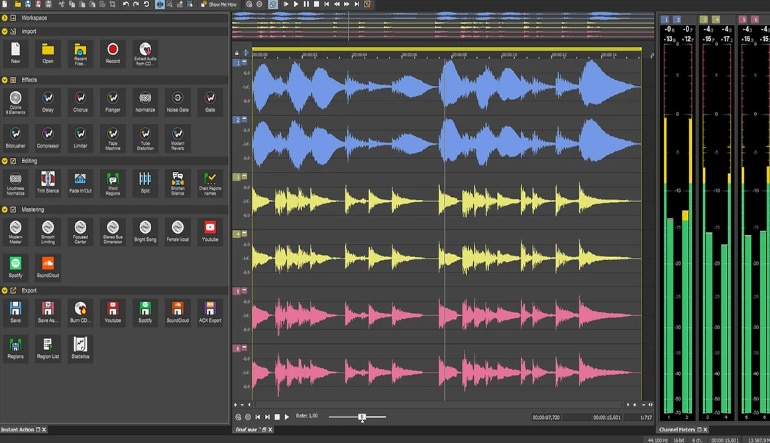
SOUND FORGE 17 provides a focused environment for recording and editing individual audio files. Users can capture vocals, instruments, podcasts, voice recordings, and other sound sources, then edit the resulting material directly within a waveform-based workspace.
Editing tools make it possible to remove unwanted sections, adjust selected areas, reorganize material, and prepare recordings for further processing. This workflow is suitable for both creative audio work and practical editing tasks where precise control over recorded sound is required.
Restore and Clean Up Audio Recordings
SOUND FORGE Audio Studio 17 includes tools for restoring and improving existing audio. This makes it useful for working with recordings that contain unwanted noise or material transferred from older analog sources.
Users can digitize recordings such as vinyl and then process the resulting audio to improve clarity before editing or mastering. Restoration tools can also support podcast, voice, music, and archival audio workflows where cleaner source material is needed.
Shape Audio with Effects and Mastering Tools
SOUND FORGE Audio Studio 17 provides audio effects and processing tools for changing the tone, space, dynamics, and overall character of recordings. Tools such as modernEQ and modernReverb can be used alongside the included wizardFX effects and compatible VST plug-ins.
Mastering capabilities help users refine completed audio after recording and editing. Level analysis and visualization tools provide additional information about the signal while processing material for its intended listening or distribution format.
Edit Podcasts and Spoken-Word Audio More Efficiently
Audio Studio 17 is also designed for spoken-word production. Podcast and voice recordings can be captured, edited, processed with effects, cleaned up, and prepared as finished audio within the same application.
The Truncate Silence function can reduce unnecessary pauses in recordings, helping streamline editing when working with interviews, narration, podcasts, and other speech-focused material.
Who Will Like SOUND FORGE Audio Studio 17
- Music creators who need precise editing and processing for individual audio files.
- Podcasters recording, editing, and preparing spoken-word content.
- Voice-over creators and narrators working with recorded speech.
- Musicians editing vocals, instruments, and other recorded performances.
- Home-studio users who need recording, restoration, effects, and mastering tools.
- Users digitizing vinyl records and other analog audio sources.
- Content creators preparing audio for multimedia projects.
- Audio enthusiasts who want dedicated waveform editing and restoration tools.