










Final Cut Pro combines revolutionary video editing with powerful media organization and incredible performance to let you create at the speed of thought.Blazing pro performance. With optimizations for Apple silicon and i ...
Final Cut Pro combines revolutionary video editing with powerful media organization and incredible performance to let you create at the speed of thought.
Blazing pro performance. With optimizations for Apple silicon and its modern Metal engine, Final Cut Pro allows you to edit more complex projects and work with larger frame sizes, higher frame rates, and more effects - all at incredible speeds. And it’s built to harness the extreme power of the new MacBook Pro for next-level performance.The tools you need. From start to finishing. With great new features and an intuitive design, Final Cut Pro accelerates post-production. So editors can create
Revolutionary Video Editing
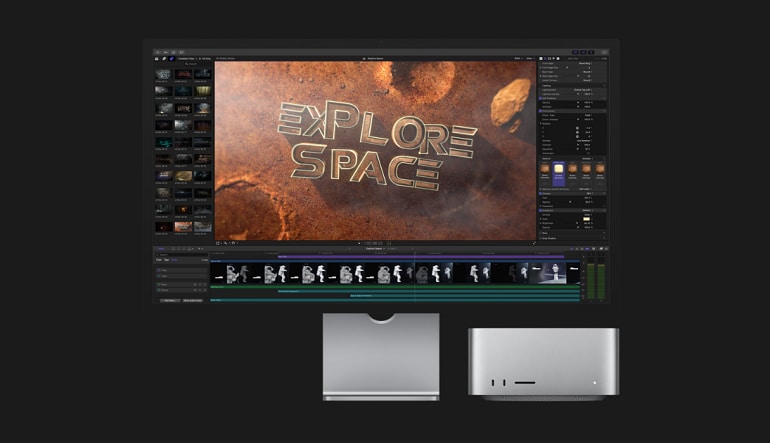
The Magnetic Timeline uses advanced metadata and Clip Connections for faster, easier editing
Enhanced Timeline Index lets you drag and drop audio roles to rearrange the layout of your timeline
Powerful drag-and-drop Object Tracker automatically matches titles and effects to the movement of faces or objects
Change focus points or the depth effect effect for video shot in Cinematic mode on iPhone 13 (requires macOS Monterey)
Edit multicamera projects with automatic syncing and support for up to 64 camera angles
Automatically transform projects for square or vertical delivery with Smart Conform
Import and edit 360° equirectangular video in a wide range of formats and frame sizes
Create, edit, and deliver closed captions from within Final Cut Pro
Extend the capabilities of Final Cut Pro with third-party workflow extensions
Powerful Media Organization
Organize your work within libraries for efficient media management and collaboration
Create proxy copies of your media for portability and performance
Apply custom keywords or favorites on the fly as you select clip ranges
Smart Collections dynamically organize content for you to quickly find any shot in a few clicks
Locate duplicate media in the timeline using highlighted clip ranges or the Timeline Index
Incredible Performance
Improved speed and efficiency on Mac computers with Apple silicon
Unrivaled performance with optimizations for the M1 Pro, M1 Max and M1 Ultra chips on the new Mac Studio and MacBook Pro
Work with a broad range of formats including ProRes, RED, XAVC, AVCHD, Avid DNxHR®, Avid DNxHD®, H.264, HEVC, and more
Compelling, Customizable Effects
Beautifully animated, easily customizable 2D and 3D titles
Change the look of titles, transitions, and effects using intuitive controls
Choose from an ecosystem of third-party FxPlug plug-ins with custom interfaces
Integrated Audio Editing
Assign roles during import to easily track and organize your project
Expand and edit multichannel audio files directly in the timeline
Apply intuitive Logic-based effects and reduce background noise to isolate voices
Sync video with separate audio in a single step with instant audio waveform matching
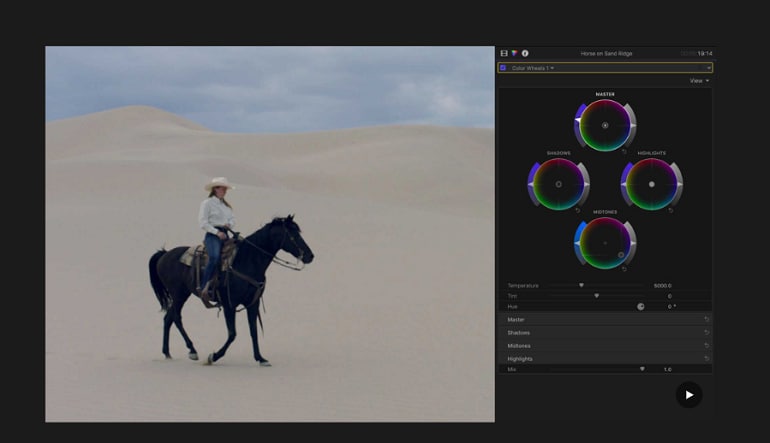
Intuitive Color Grading
Import, edit, and deliver video in standard color spaces, or in Rec. 2020 and HLG color spaces
Powerful color wheels and curves for precise adjustments with keying and masks
Accurately view HDR on the MacBook Pro and Pro Display XDR
One-Step, Optimized Output
Incredibly fast export for playback on Apple devices and upload to websites such as Vimeo and YouTube
Export audio stems and multiple versions of a finished video using roles metadata
Import and export XML for third-party workflows like color grading and sound mixing
System Requirements: macOS 11.5.1 or later, 4GB of RAM (8GB recommended for 4K editing, 3D titles, and 360° video editing), Metal-capable graphics card, 1GB of VRAM recommended for 4K editing, 3D titles, and 360° video editing, 4.5GB of available disk space.
Some features require Internet access; fees may apply. Blu-ray recorder required for burning Blu-ray discs.
Minimal requirements
Recommended requirements
System
macOS 12.6 or later
macOS 12.6 or later
Memory
4GB of RAM
8GB recommended for 4K editing, 3D titles, and 360° video editing
Graphics
1 GB Video RAM
1GB of VRAM recommended for 4K editing, 3D titles, and 360° video editing1
Disk space
5.5GB of available disk space
Other
Some features require Internet access; fees may apply. Blu-ray recorder required for burning Blu-ray discs.
Advertisement
SPONSORED
Reviews
Check what our customers think of this title
Overall item rating
5.0
2 reviews
2 out of 2 (100%) reviewers recommend this item
Rating
Select a row to filter reviews
1
0
2
0
3
0
4
0
5
2
Review this item
Get a 5% discount on your next purchase
as a thank you
Signed-in customers with at least 1 purchase can review
1 - 2 of 2 reviews
Sort by:
steffiReviewed on: Jun 2, 2025
5.0Apple
Very professional video editing program, get compressor and motion too to really make use of this
Recommends this item
Yes
Verified purchase
Was this review helpful?
1
0
ComanderTomReviewed on: Nov 12, 2024
5.0Apple
Best video editing program for mac users. If u ever used Imovie than it will feel familiar.
Recommends this item
Yes
Was this review helpful?
3
0
Advertisement
SPONSORED
Get inspired by our articles!
Best Survival Horror Games of All Time
The survival horror genre is broad and popular, and not just because both survival games and horror...
Best G2A Gaming Deals This Month - Save Big Today!
Looking to score great games without overspending? Check out this month’s best G2A deals
15 Games to Push Your Gaming Skills to the Limit (And Maybe Beyond)
Are you ready for the ultimate gaming challenge? Explore our list of games that will push your skills to the...
Best PC Games of 2024: A Complete Yearly Recap
Explore the top PC games of 2024! From action-packed adventures to stunning RPGs, discover the year’s must-play titles.
Subscribe to get updates, confirm your subscription,
and receive a discount code to use instantly
By subscribing to the newsletter, you consent to G2A.COM Limited sending commercial communications to your email, including personalized offers available on the G2A Marketplace. The administrator of your personal data is G2A.COM Limited. You can withdraw your consent at any time. If you withdraw your consent, it will not affect the legality of your data processed before. We process your personal data in line with the Privacy and Cookies Policy. Every new user who subscribes for the first time to the newsletter receives a one-time 11% discount code that may use once for future purchases on the g2a.com platform. The code is valid for 3 days and can only be used to purchase activation keys (excluding preorders) under EUR 50.00 in the categories: video games, software, randoms, and DLC, from sellers participating in this discount program. G2A.COM Limited is not responsible for adjusting the value of any promotional items, this is solely up to participating sellers.