
How to activate:
- Launch the trial version and then immediately close the application
- A trial dialog will appear with a Buy Now or Already Purchased button
- Click the Already Purchased button and enter the serial number
- Activate
Can activate in:
United States
Check country restrictionsType:
Key
Region:
GLOBAL
Transform any image into a captivating animation in three simple steps with Corel PhotoMirage!



How to activate:
Corel PhotoMirage is photo animation software that transforms still photos, illustrations, and digital artwork into dynamic animations using intuitive motion, anchoring, masking, and export tools.
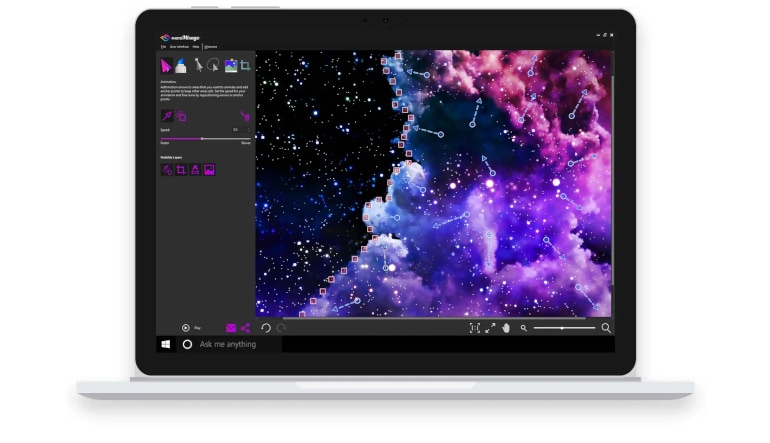
Corel PhotoMirage adds movement to selected areas of a photograph or illustration without requiring a traditional video-editing workflow. Motion Arrows determine the direction in which pixels move, while Anchor Points identify the parts of the composition that should remain stationary. This approach makes it possible to animate elements such as water, clouds, hair, fabric, smoke, or light effects.
The Mask tool helps isolate larger areas that must remain motionless and provides adjustable brush size and edge feathering for smoother transitions. Rectangular and freehand selection tools make it easier to manage groups of Motion Arrows and Anchor Points, allowing animation markers to be moved, resized, rotated, or deleted together.
Smart Photo Fix can automatically adjust key image properties, including brightness, saturation, sharpness, and white balance. Cropping presets help prepare projects for standard image, video, and social media dimensions, while visibility controls let users hide masks, crop frames, and animation markers for a clearer workspace.
Animations can be previewed throughout the editing process, making it easier to adjust movement direction and playback speed. Finished creations can be exported using preset or custom settings, with control over properties such as output format, dimensions, frame rate, codec, quality, and loop duration.