CorelDRAW 2020 Standard combines vector illustration, page layout and photo-editing tools for creating graphics, promotional materials and personal projects on Windows.
CorelDRAW 2020 Standard Key Features
- Create vector illustrations, drawings and scalable graphics.
- Design page layouts for flyers, brochures, posters and business cards.
- Edit photos with the included Corel PHOTO-PAINT Standard 2020 application.
- Arrange and customize text with typography and OpenType tools.
- Prepare sharp, pixel-accurate graphics for websites and digital content.
- Use templates, fonts, clipart, photos, fills and photo frames included with the software.
- Learn the available tools through training videos, helpful tips and a Quick Start Guide.
Vector Illustration and Page Layout
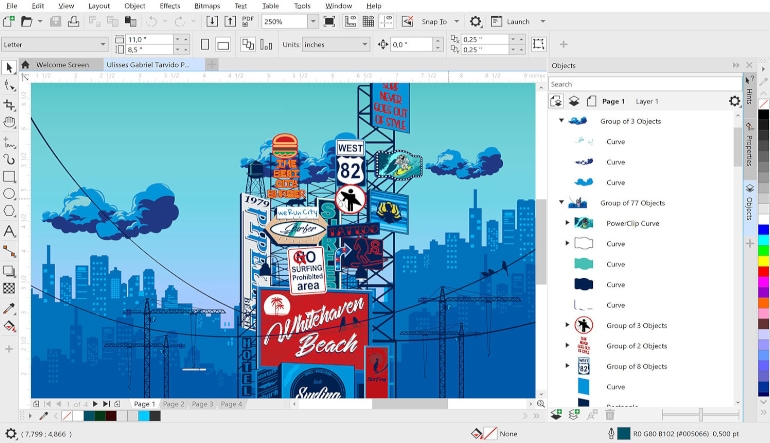
CorelDRAW Standard 2020 provides tools for drawing shapes, working with lines, applying fills and arranging objects on a page. Users can combine illustrations, photographs and text to create invitations, advertisements, certificates, letterheads, posters and other visual materials.
Layer-Based Photo Editing
Corel PHOTO-PAINT Standard 2020 supports pixel-based image editing with layers. It can be used to adjust color and tone, apply visual effects, remove imperfections and enhance photographs before adding them to a design or exporting them as separate images.
Typography and Text Effects
A selection of text tools makes it possible to format headings, paragraphs and decorative lettering. Users can apply effects such as drop shadows and take advantage of supported OpenType features to give documents and graphics a more polished appearance.
Graphics for Print and Web
The software supports both printed and digital projects. Page-layout tools help organize content for promotional materials, while web-graphics presets and pixel-accurate controls help produce images with clean edges for websites, online advertisements and social media.
Ready-Made Creative Content
CorelDRAW Standard 2020 includes clipart, digital images, royalty-free photographs, fonts, photo frames, fills and more than 60 professionally designed templates. These resources help users begin projects quickly without building every visual element from scratch.
Who will like CorelDRAW 2020 Standard
- Home users creating invitations, cards, posters and personal graphics.
- Hobbyists interested in vector drawing and digital design.
- Small-business owners preparing flyers, advertisements and branded materials.
- Users who need illustration, layout and photo-editing tools in one package.
- Beginners who prefer templates, tutorials and accessible creative tools.
- Content creators producing simple graphics for websites and social media.